


Connected devices need over-the-air updates
As a manufacturer of a connected (IoT) device, you want to roll out firmware updates remotely, over the air (OTA). Because updates will come anyway. Whether it's small improvements, fixing bugs or new features. And it's a waste to send a technician out just to install an update.
But setting this up properly takes some doing. An installation that stops working after a failed update suddenly becomes an emergency call-out. And you want to stay in control: the digital door firmly locked, and the keys in your own hands. So nobody can suddenly install a hacked version, or pretend to be your equipment.
The basis: every device its own digital passport (device certificate)
The basis is a well-secured connection to your devices. Every device connects to the server. But how do you know the server is genuine, and the other way around? For that we use what the jargon calls mutual TLS (mTLS).
It's really no different from two people who only know each other by name. By identifying themselves with a passport, they can trust who is who.

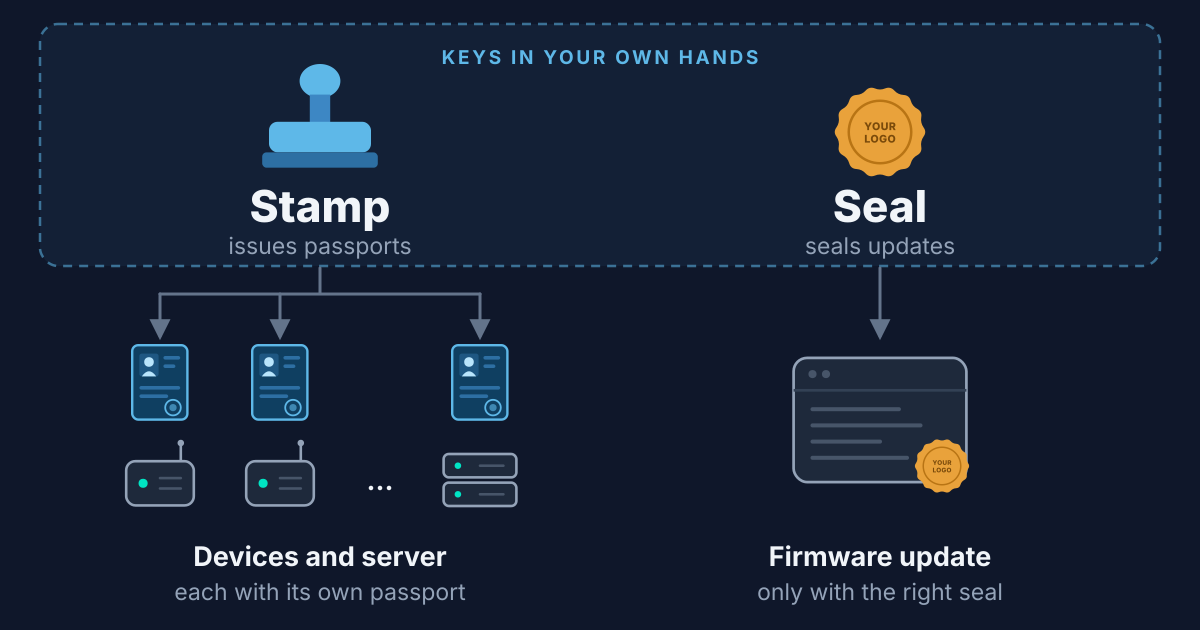
If you control both the server and the devices (or have a supplier who does that for you), you can issue your own passports, with your own stamp as the mark of authenticity. Your devices can then check strictly for that mark, without being fooled by a fake passport. With this approach, the connection is only made once the device is sure it's talking to the real server. And the other way around.

Why you also need signed firmware updates
With a good passport check, you might think we're done. But that update package the device receives, what's actually in it? Who packed it? Your server is really just a go-between here: the firmware you prepared is passed on to all devices.

By sealing (signing) the update package separately, the device will only apply official, correct updates. Whatever happened to the package along the way, even if your server gets hacked.

Update refused? Then the device simply keeps running the current version.
In short: the workflow
The life of a device with this approach:
- Developers write a new firmware update. You can do this in-house or outsource it.
- You seal the update. Only possible with your seal key
 .
. - During production, every device gets a passport. Only possible with your unique stamp key
 .
. - In the field, your devices can be used safely for years. Even if someone got hold of a passport, the impact stays limited to one device.
- When you roll out an update, every device verifies the seal. An unofficial update won't get through.

Look at the bottom row of the figure. There are two digital keys, each used at one specific moment. So for most steps you don't need them at all!
How can you check without the key?
Every device (and your server) gets an imprint of your stamp, so to speak. By comparing against it, you can check whether a stamped passport is genuine, but you can't just put a new stamp on one. Like the watermark in a banknote: it's no secret what it looks like, anyone can check it. But printing your own banknote is another story.
For the techies: this is public-key cryptography. Each key has a private half that you use to make the stamp or seal, and a public half that every device uses to check authenticity. The passport is an X.509 certificate, the stamp is your own certificate authority (CA), and the seal is a digital signature on the firmware that the bootloader checks.
Key management: keeping your keys safe
So your keys don't need to be on your server, on your devices or with the developer: you can safely keep them in your own hands.

There are special little devices that act as a digital safe (hardware security key), similar to a hardware wallet for bitcoin. With one, you can seal and stamp without the key ever being copied.
That way there's no risk of it leaking through stray copies. Do keep a good backup, of course! For example, spare keys in a safe.
Checklist: IoT security questions for your supplier
Curious, as a manufacturer, how things actually stand with your devices? Ask your supplier:
- Does every device have its own 'passport' (certificate)? Or do all devices share the same key or password?
- Is the connection secured, and do device and server check each other? Or only in one direction?
- Are firmware updates sealed (digitally signed), and do the devices verify the signature?
- What happens to your device if an update is interrupted? For example, because the power fails?
- Who manages the keys? Who has access, and how are backups arranged?
- If one device is stolen or hacked, can you lock it out?
How we do it in sensor-link
We work with an automated build pipeline (CI pipeline) that only seals a new version once all tests pass. If you like, also only after a colleague has approved it: the four-eyes principle.
At the factory, the hardware is tested with separate test firmware. Only at final assembly do you load the latest firmware and the unique passport. We have handy tools that let you do this in no time, with the keys in your own hands.
Our secure bootloader is installed on the device. This small piece of software runs before the application starts and is responsible for installing updates safely. This is how it works:
- The application downloads the complete update package and restarts.
- The bootloader verifies the waiting package. Invalid? Then it's ignored and we start the existing version.
- Does the seal check out? Then the update is installed and started.
Because the new update is staged as a copy, even an abruptly interrupted update can simply carry on after a restart.
And what does that cost? Passports, seals, a secure bootloader: those are solved problems. We already invented those wheels in sensor-link, so you only pay for what makes your product unique.
What fits your product?
Of course the trade-offs are different for every product. What's the impact if it goes wrong? What does it cost when your installations stand still after a failed update? How big is the threat: are there people who would gain from copying or sabotaging your devices? Even if none of that seems to apply, remember that the requirements of the Cyber Resilience Act are coming.
Curious what fits your product and risks? Schedule a no-obligation call.