A behind-the-scenes look at a real PCB review
This is an example review we did for an internal project: a Multi Battery Charger PCB. Below you can see the type of feedback you can expect from us: concrete, substantiated, and focused on improvements that matter.
This is a translation of the original review in Dutch.
Tip: signals without net labels are not easily recognizable in the layout. Where needed, you can add net labels in your schematic to make layout work easier.

Q6+R19 are not really needed, this only saves ~6uA according to the datasheet. I would leave them out (leave SW unused).
D2 is connected backwards. This is a zener diode (which conducts current in 'reverse direction' above a certain voltage). The BZX84C4V7 seems like a suitable variant (more specific part number for the 4.7V variant).
DNP resistor from +3.3V to U2 pin 6. If needed, we can solder a 0-ohm there with the prototype (instead of regulator circuit Q5/D2/R18).
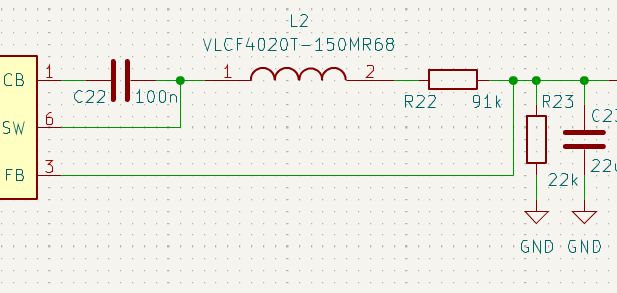
FB pin is not correct. Compare with datasheet section 9.2
C18-C20 are indeed available in 0603, C21 can be removed (if not, update C18-C20 footprints and place the smallest footprint closest to U3 in layout).
SRN, SRP lines and component RSR1. I would take a bit more space in the schematic (put it in a subsheet) and try to place the components more clearly like in the datasheet.

CE pin should connect to the other microcontroller GPIOs instead of vref if possible. That way we still have the option to turn charger(s) on/off in software. If there aren't enough pins, you can share them per 2 packs.
Charger: there's a capacitor on CE. I think it belongs on VREF:

A_DIAG1 is now connected with 10K to ground. This becomes a voltage divider together with the 2M series resistor in the pack, so remove it! For EMC you could add a small capacitor (e.g. 22-50pF).
Better idea: ESD protection on the battery connector is a good idea, because the user can touch it and/or static zaps can occur when plugging/unplugging. Suggestion: component ESDA6V1-5SC6 (in KiCad library). This component also has about 50pF of capacitance as a side benefit, so it can work as both an EMC filter and ESD protection.
Tsense and A_DIAG1 to one of the pins of the ESD chip (choose depending on what's convenient in layout).

BAT+ and BAT-.
We still need to choose this, keep enough space in your layout. I think there will also be a fuse or input filter added.

It can be useful to add some test points. In the schematic you can add a 'testpoint' symbol on signals you would want to measure during verification. Just see where it fits in the layout, doesn't have to be on every signal. The simplest footprint I often use is TestPoint:TestPoint_Pad_D1.0mm.
6x3A * 8.4V / (24V * 90% efficiency)?
J1. You can use this footprint: Jitter_Footprints:Fuse_2410_6125Metric. Component can be one from the Bel Fuse 0679H0250 series (choose value slightly above maximum current).
GND (very unusual):
CSN. Connect only this one to board groundCSPL/GND/EP): all connect together to BAT-C92) between REG and BAT-
This chip effectively has its own local 'ground' that is only connected to the rest of the board through the sense resistor. I would normally never recommend this but this is apparently how this chip is designed.
BAT- trace shorter.
BAT- should be wider. The same current flows through here as through BAT+!
D31) is already nicely close to the connector, but I would route the traces further away from other signals so the ESD pulse doesn't 'jump over' or interfere.
Tip: the pins on the ESD protection chip are interchangeable, if it's convenient for your layout you can also use other pins (doesn't have to be pin 4/6).
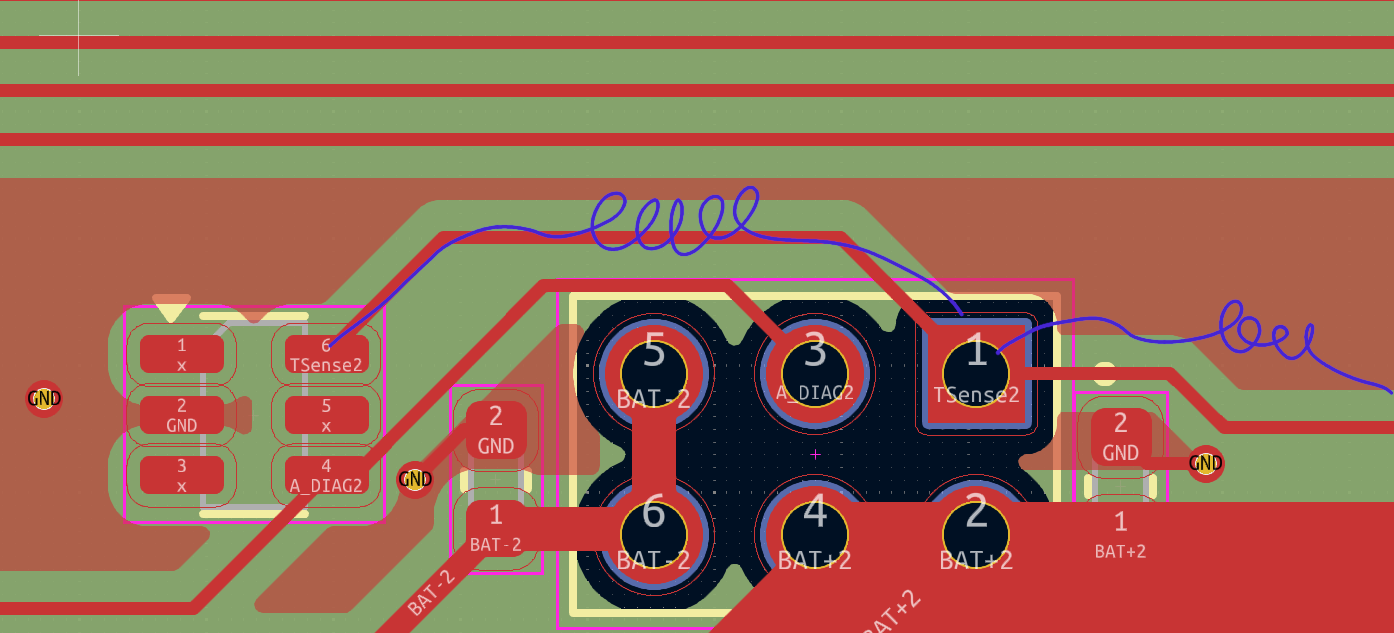
I would do something like this (as an example):


An example of how I would do this part:

REGN capacitor, ideally you would prioritize this in the layout over the resistor block (those can also move a bit to the left).

Things to check after all other changes:
This is more of a tip, current layout is good enough. I expect the charging current will be a few % lower than expected because of this, but that's not that precise anyway.
Perhaps educational because this comes up often: measuring currents using a series resistor. If you want to do this accurately, it's best to use 'Kelvin style' (four-terminal sensing). This is something you can't easily indicate in the schematic, so something to always pay extra attention to in the layout.
As an example: the charger chip measures charging current by measuring the voltage drop across RSR1. Current flows in the direction of the blue arrows, and thus sees some resistance from the copper in addition to RSR1. The most accurate is to route a separate pair of traces (shown in green) directly from the resistor to the chip, without sharing them with e.g. the voltage feedback network:

We look at your PCB with experienced eyes and help you find problems before they become expensive.
See our Design Review service
